PowerPoint presenter view for one Mac screen
See speaker notes while presenting PowerPoint on one screen.
NotesPresenter keeps private notes, current-slide context, and pacing beside your PowerPoint deck for Zoom, Teams, Google Meet, and in-room talks.
Short answer
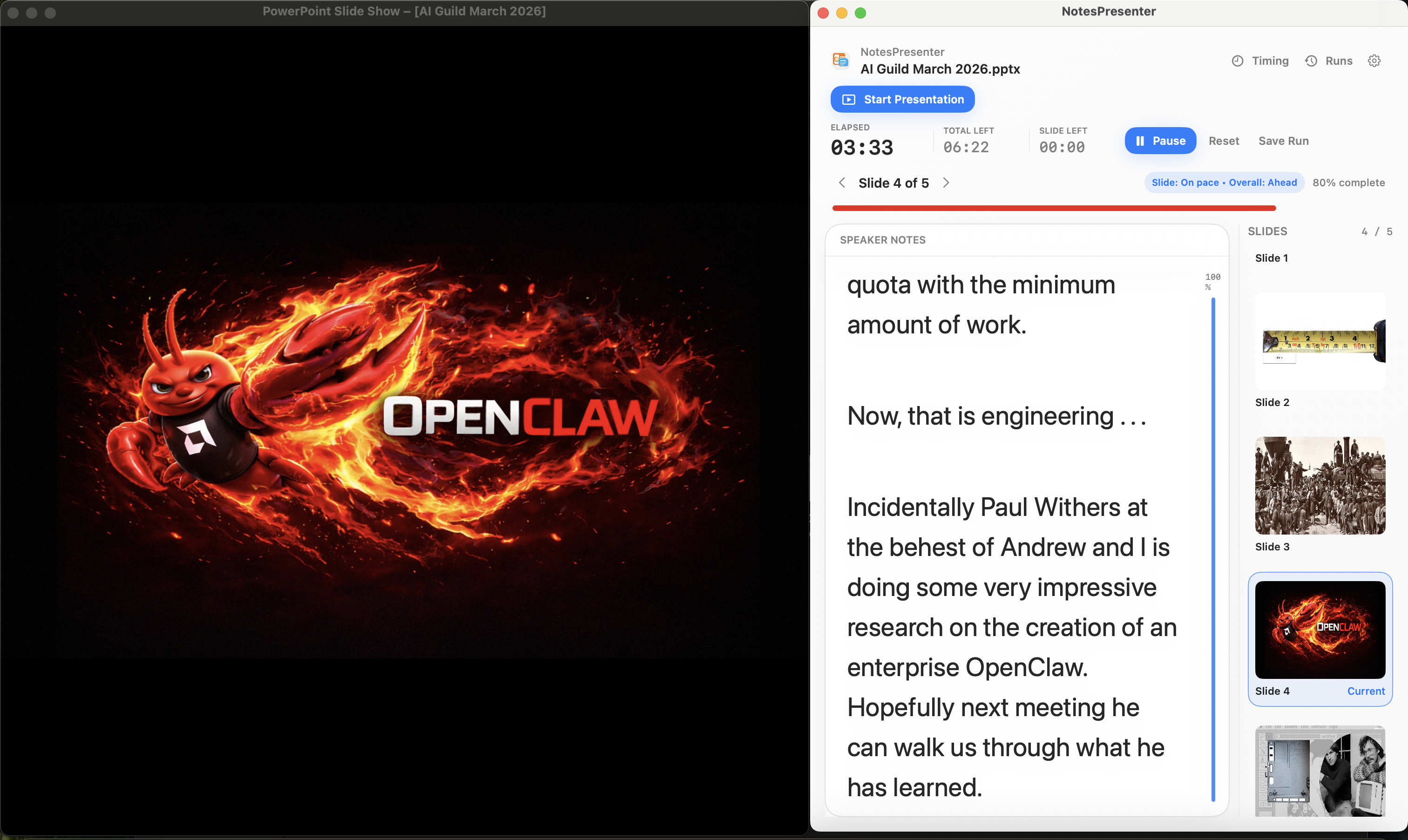
Share only the PowerPoint window. Keep NotesPresenter open beside it so attendees see the deck and you keep your notes private.
What you can do
See notes, slide context, and timing without a second monitor.
Use one screen for PowerPoint, notes, slide context, and timing.
One-screen presenter view
Keep PowerPoint on screen while your notes, slide list, and pace status stay visible beside it.
Per-slide timing
Set a total presentation target, assign time per slide, and see whether you are ahead or behind.
Current-slide context
See the current slide in a thumbnail list and read large notes without switching windows.
Presenter controls
Start, pause, reset, and save rehearsal runs from one control panel.
Direct deck workflow
Open your PowerPoint file and present without moving the deck into another app.
No cloud dependency
Your presentation stays on your Mac. No in-app analytics, sync service, or account required.
Presentation workflow
Share the deck. Keep the notes.
The safest one-screen setup is simple: prepare notes locally, share only PowerPoint, and keep NotesPresenter visible to you.
Default sharing rule
Choose the PowerPoint window in Zoom, Teams, or Meet. Do not share the full desktop.
Step 01
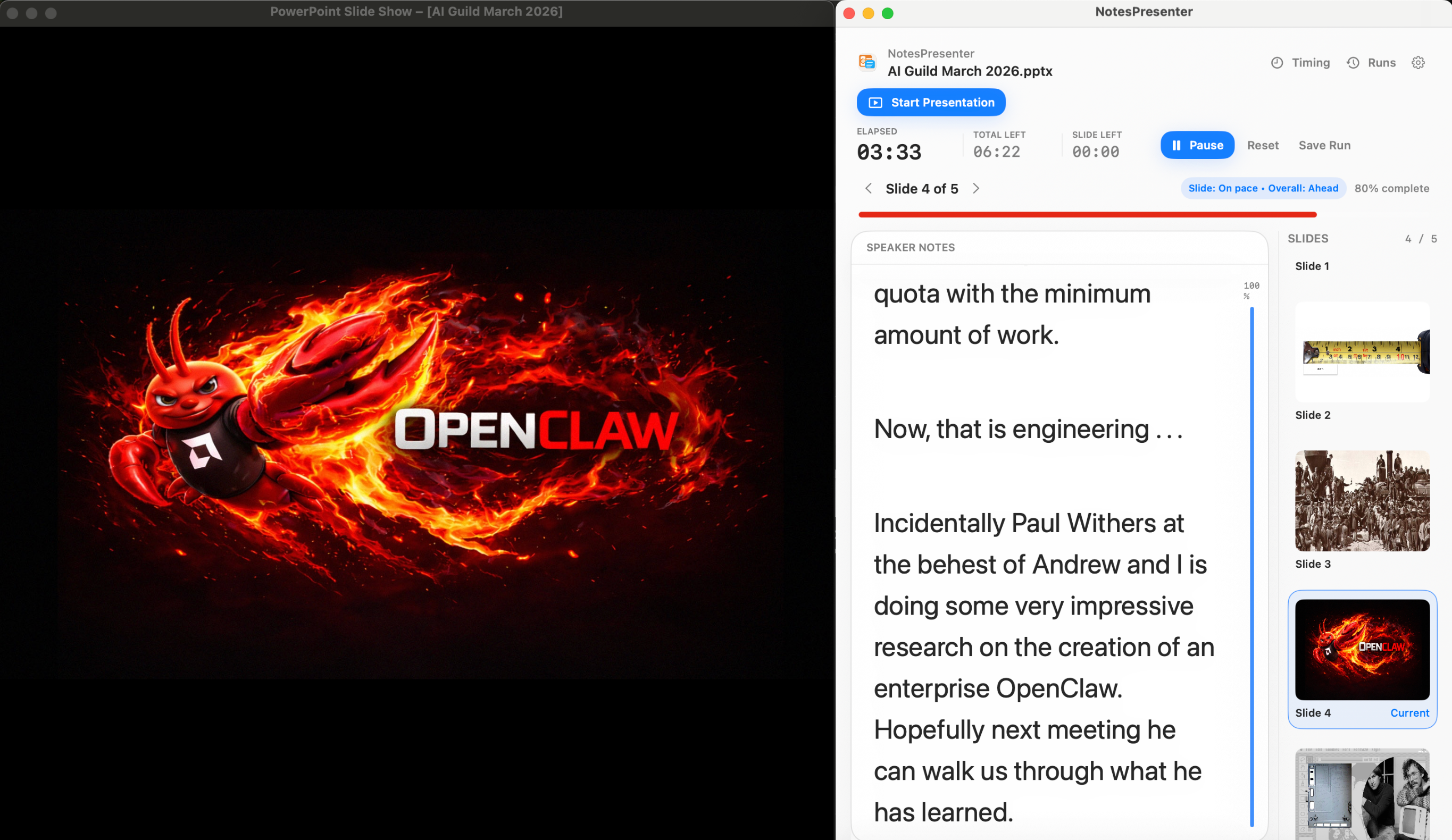
Open the deck
Load your PowerPoint file in NotesPresenter so your slide notes and timing plan are ready beside the deck.
You see
The deck notes, slide thumbnails, and timing plan before the presentation starts.
Audience sees
Nothing yet. This is your private setup step.
Result
Your speaker notes are ready before Zoom, Teams, or Meet starts sharing.
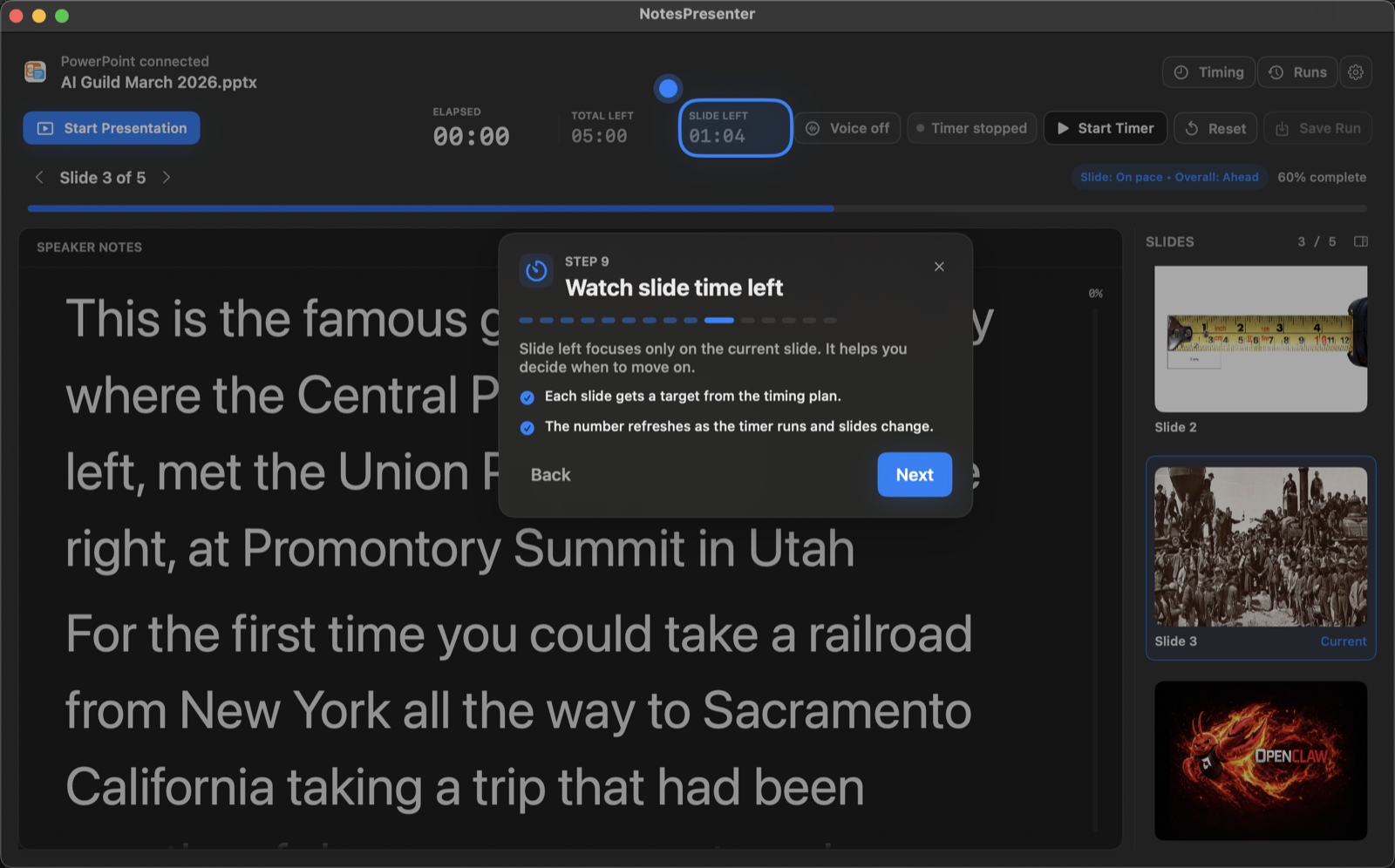
Guided setup
Onboarding teaches the workflow before your first talk.
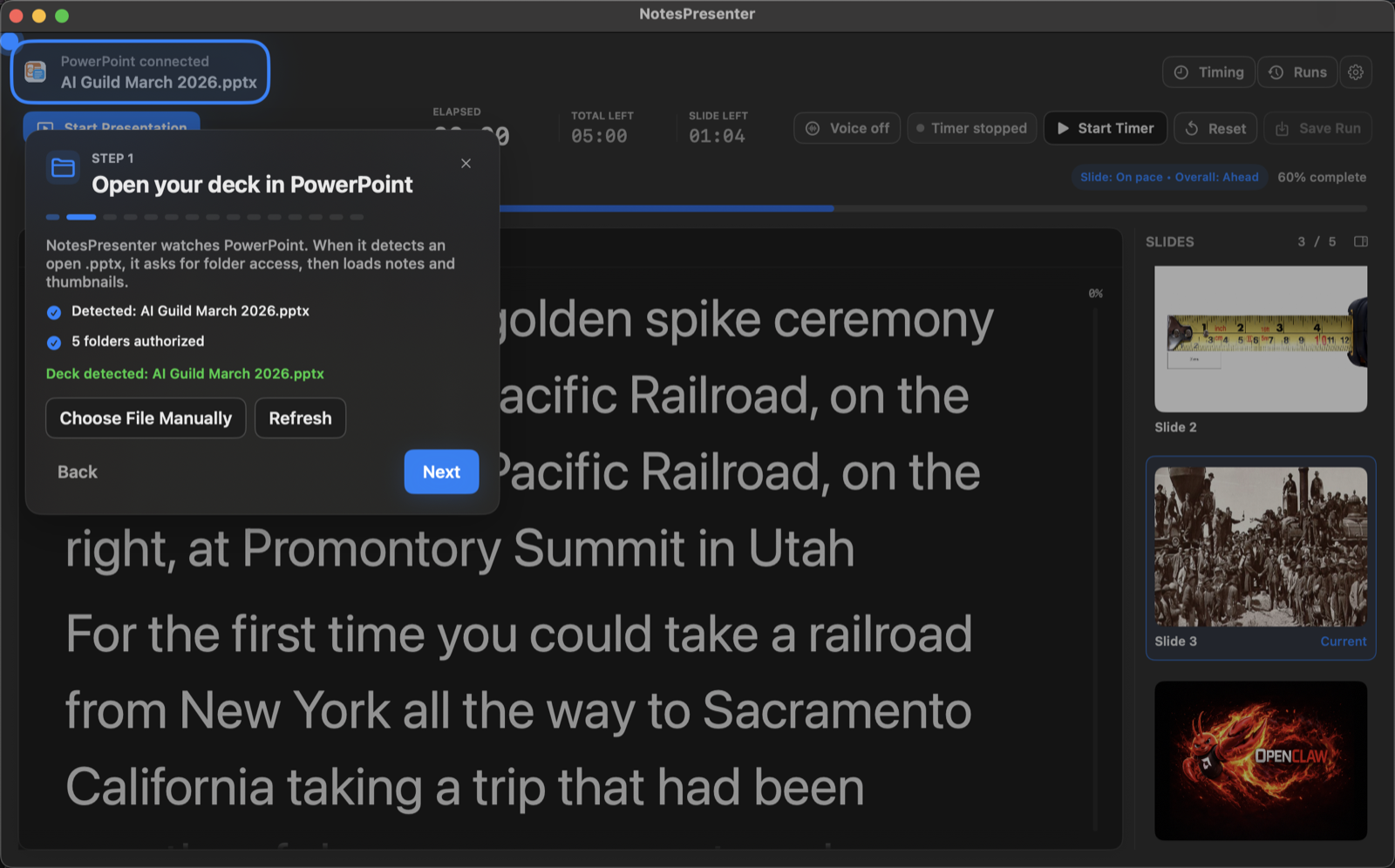
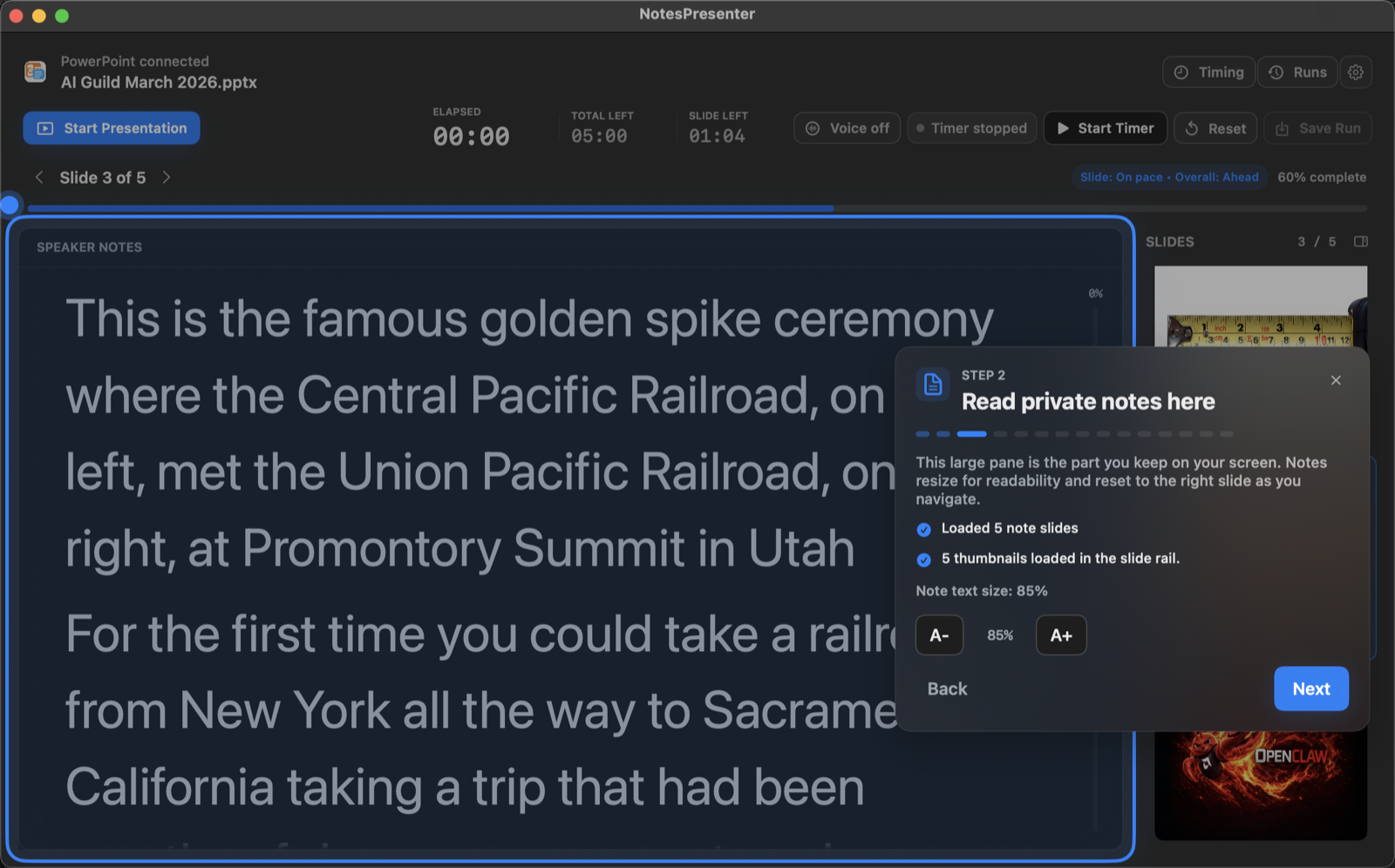
The app walks through deck connection, private notes, optional tracking, presentation start, and timing so the one-screen setup is clear before you go live.
Product details
Screens from the app.
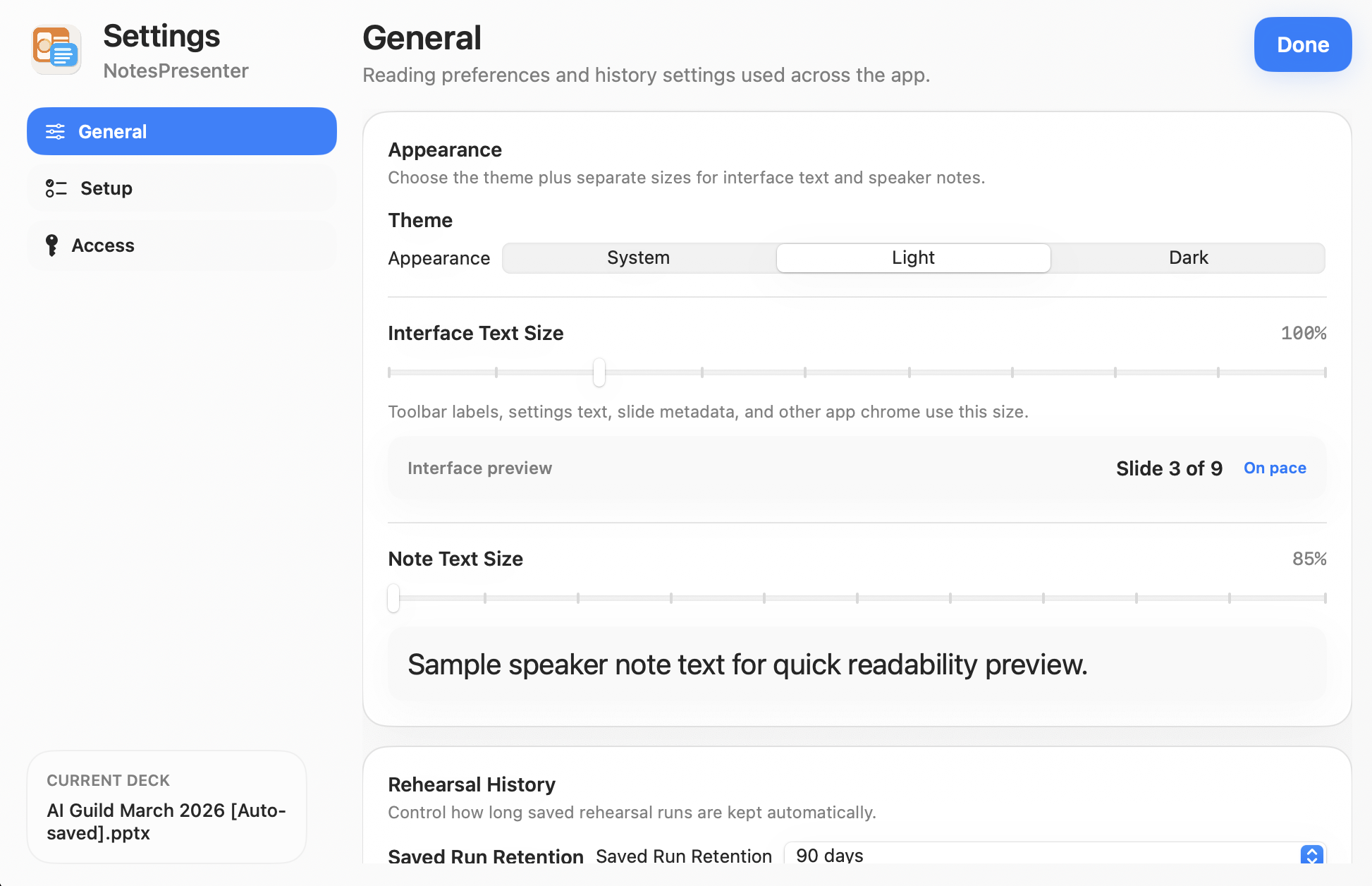
Readability
Set note size, text size, and appearance.
Choose light or dark appearance, increase note size, and adjust interface text before you present.
- Light, dark, or system appearance
- Separate note text and interface text sizing
- Preferences saved for later sessions
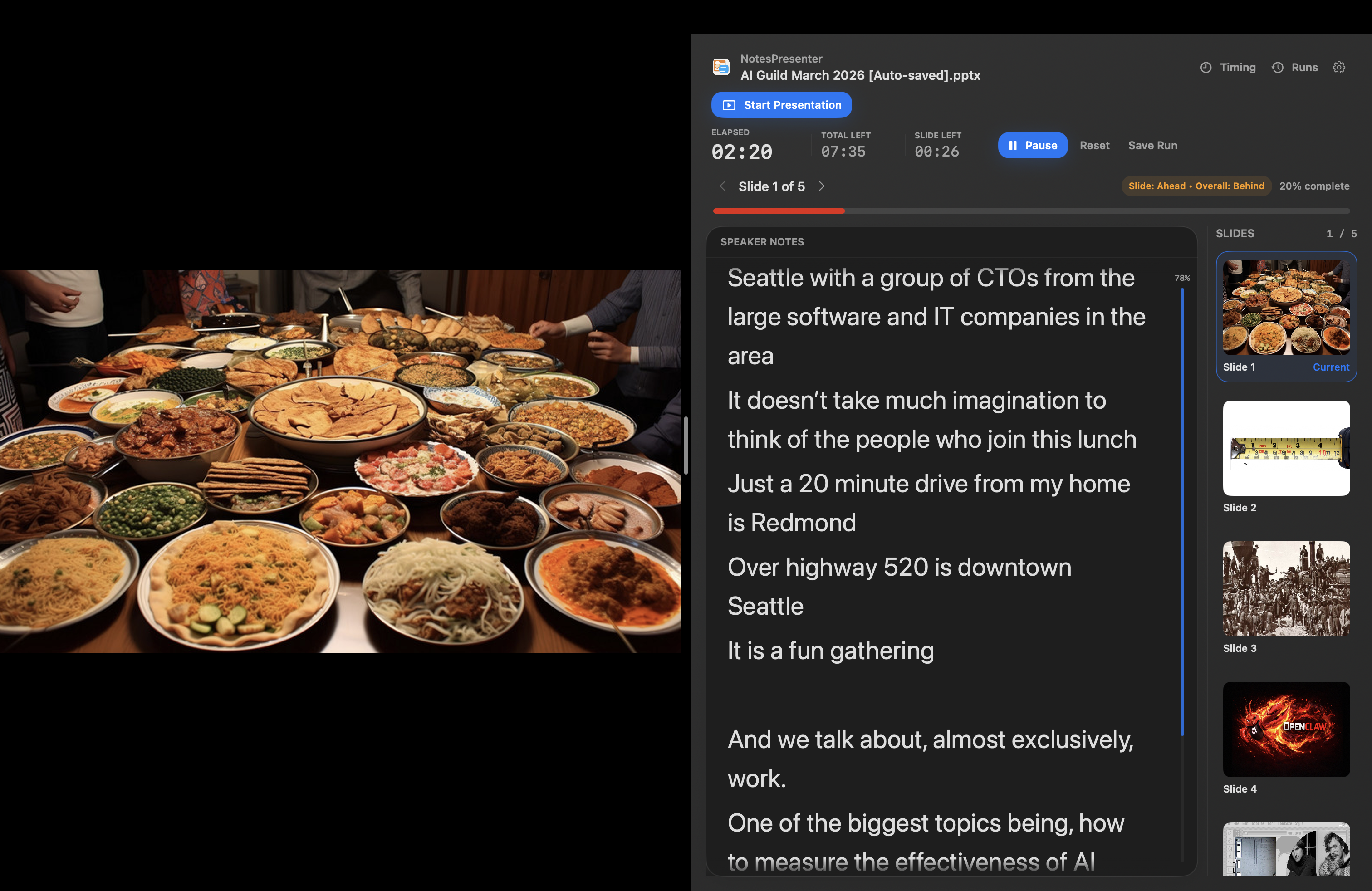
Live delivery
Keep the deck and notes side by side while you present.
See the current slide, pace status, and large notes beside PowerPoint during the presentation.
- Current slide tracking with thumbnail rail
- Pace signals while the talk is running
- Large notes that stay visible beside PowerPoint
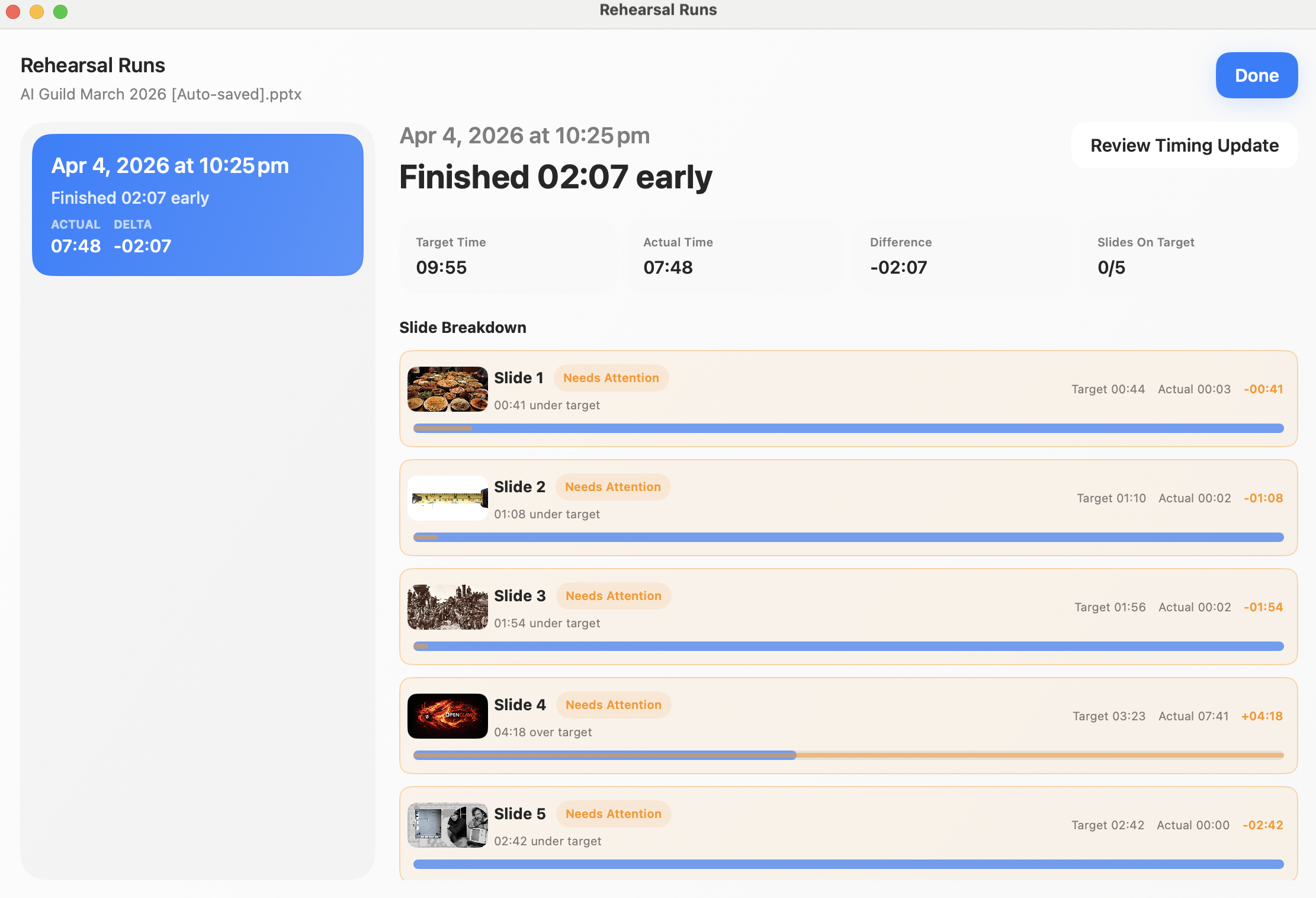
Rehearsal
Compare target time with actual time after each run.
See target time, actual time, and the slides that ran long or short after each rehearsal.
- Run history with target and actual timing
- Per-slide breakdowns
- Timing updates after practice
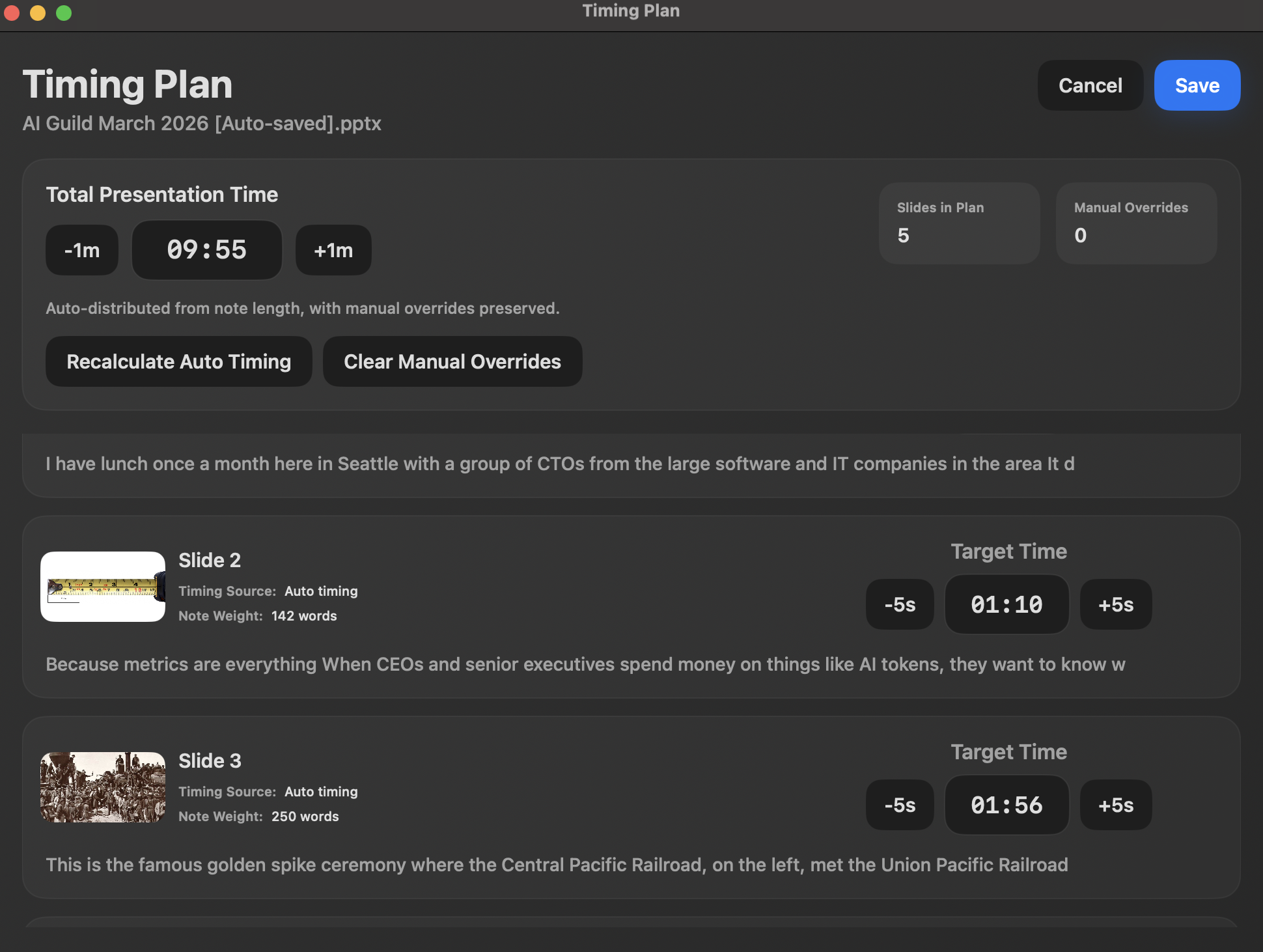
Timing plan
Set slide targets before the presentation starts.
Set a total presentation time, let the app distribute slide targets, and override any slide manually.
- Total presentation target time
- Per-slide time allocation
- Manual overrides where needed
Download NotesPresenter
Present PowerPoint with private notes on one Mac screen.
Try the one-screen workflow with your own deck. No account, cloud upload, or subscription required.
How it compares
Built for PowerPoint presenters who only have one screen.
Share the PowerPoint window, not your whole desktop, and keep notes plus timing on the same screen.
 NotesPresenterNotesPresenterOur app
 PowerPointPowerPoint Presenter View
 Google SlidesGoogle Slides Presenter View
 KeynoteKeynote Presenter Display
 OverlayTeleprompter overlay
 ExtraPPTExtraPPT Speaker Notes
Share the PowerPoint window while notes, context, and timing stay on your screen.
Microsoft documents private speaker notes with Presenter View across two monitors.
Google documents Presenter view and speaker notes for Slides presentations.
Apple documents a presenter display window with notes and current and next slides.
SpeechCue documents a transparent overlay that floats above slides and apps.
ExtraPPT documents speaker notes and slide previews in a floating window.
Built around opening a PowerPoint deck and sharing the PowerPoint window.
Presenter View is built into PowerPoint.
Presenter View is for Google Slides presentations in the browser.
Presenter Display is for Keynote presentations.
SpeechCue works over PowerPoint, Keynote, Google Slides, and meeting apps.
ExtraPPT detects the active PowerPoint presentation.
Shows PowerPoint notes, thumbnails, current slide context, and presenter controls.
Presenter View shows current slide, next slide, speaker notes, and slide navigation.
Google documents Presenter view with speaker notes.
Keynote presenter display can show presenter notes, current slide, next slide, and thumbnails.
SpeechCue is a script overlay; public docs do not describe slide-linked PowerPoint notes.
ExtraPPT lists speaker notes, slide previews, and standard PowerPoint keyboard controls.
Plan per-slide timing, monitor pace, and review rehearsal runs.
Presenter View includes pause/reset for the slide timer and current time.
The Google support page cited here documents speaker notes, not rehearsal timing tools.
The Apple source cited here documents presenter display behavior, not rehearsal timing analysis.
SpeechCue documents scroll speed controls, not slide timing analysis.
The ExtraPPT page cited here does not list timing or rehearsal review tools.
One-time unlock, no account, no cloud upload, and PowerPoint files stay on your Mac.
PowerPoint is part of Microsoft Office/Microsoft 365, not a standalone notes utility.
Google Slides is a Google Workspace/browser presentation tool.
Keynote is Apple presentation software for Mac.
SpeechCue states $9.99 one-time, no account, offline, and notes stay on your Mac.
ExtraPPT states no subscriptions, ads, hidden fees, or data collection.
Comparison uses public docs and product pages. If a source does not list a feature, the table says "Not listed" instead of assuming support.
Pricing
Try it free. Full version is $9.99 one time.
No subscription, ads, or account setup.
Full version
$9.99 one-time purchase
Common setups
Start with the workflow that matches how you present.
PowerPoint presenter view on one screen on Mac
Set up notes, current slide context, and timing beside PowerPoint on one Mac screen.
Read this guide
PowerPoint speaker notes in Zoom on one screen
Share the PowerPoint window in Zoom and keep NotesPresenter visible privately on your Mac.
Read this guide
PowerPoint speaker notes in Teams on one screen
Present in Microsoft Teams while keeping PowerPoint notes private on your Mac.
Read this guide
PowerPoint speaker notes in Google Meet on Mac
Share PowerPoint in Google Meet while NotesPresenter keeps notes and timing local.
Read this guide
Single-monitor PowerPoint notes
Use one Mac monitor for PowerPoint, speaker notes, current slide context, and timing.
Read this guide
Teleprompter for PowerPoint on Mac
Make PowerPoint speaker notes easier to read while keeping them tied to the current slide.
Read this guide
PowerPoint notes for teachers on Mac
Keep lesson notes and slide timing visible while teaching from one Mac screen.
Read this guide
PowerPoint notes for academic presentations
Use private notes and timing for conference, seminar, and thesis talks on Mac.
Read this guide
PowerPoint notes for webinar presenters
Share PowerPoint in a webinar while keeping notes and timing private on your Mac.
Read this guide
PowerPoint notes for consultants
Keep client talking points and timing visible while sharing only the PowerPoint deck.
Read this guide
PowerPoint notes for product demos
Keep demo prompts and timing visible while sharing only the presentation deck.
Read this guide
PowerPoint rehearsal timer for Mac
Rehearse a timed PowerPoint talk and compare target time with actual time.
Read this guide
PowerPoint slide timing rehearsal on Mac
Plan per-slide timing and rehearse a PowerPoint presentation before the live talk.
Read this guide
Large PowerPoint speaker notes on Mac
Make PowerPoint notes easier to read while keeping slide context and timing visible.
Read this guide
PowerPoint speaker notes floating window on Mac
Use a separate notes window beside PowerPoint with slide context and timing.
Read this guide
PowerPoint speaker notes in Webex on Mac
Share PowerPoint in Webex while keeping NotesPresenter private on one Mac screen.
Read this guide
PowerPoint speaker notes in Amazon Chime
Share PowerPoint in Chime while keeping private notes and timing visible locally.
Read this guide
PowerPoint notes while screen sharing on Mac
Share PowerPoint while keeping speaker notes private on your Mac screen.
Read this guide
PowerPoint notes while recording video
Record a PowerPoint presentation while keeping notes and timing visible locally.
Read this guide
PowerPoint Presenter View with one monitor
Use one Mac monitor for PowerPoint, private notes, current-slide context, and timing.
Read this guide
PowerPoint Presenter View without a second monitor
Use private notes and timing beside PowerPoint when no second display is available.
Read this guide
PowerPoint notes while sharing screen
Share PowerPoint from a Mac while keeping speaker notes private locally.
Read this guide